Populating cubes — Links & integrations
You can type values straight into a cube, but most real models are fed from somewhere else. A Link is a saved definition that populates a cube from a source: it remembers how the source's data maps onto the cube's coordinates, and you can re-run it whenever the source changes.
Source types
A Link draws from one of four kinds of source:
- A file (Data Table) — an Excel or CSV file you've uploaded becomes a Data Table (rows and columns), which a Link maps into a cube. To move a file's values in once, without a table or a Link in between, see Import a spreadsheet into a cube.
- Another cube — copy or combine values from one cube into another, mapping dimension to dimension.
- A URL — a spreadsheet hosted at a web address, fetched fresh on each run.
- An integration — a live connection to an external system (see below).
How the mapping works
When you create a Link (the Link editor walks you through it), you tell XCubes:
- which source columns map to which dimensions — so each row lands at the right coordinate. Item codes are matched directly, or translated through an mapping table when the source codes things differently from your model;
- which column holds the value to write into the cell;
- the transfer mode —
replace(overwrite),add(sum into), orsubtract.
A Link can also carry several value columns at once: a multi-value link binds each chosen column to an item of one dimension — a Debit and a Credit column landing on the matching items of a Measure dimension, say — and every source row then writes one cell per bound column. Value columns are matched by column name, so reordering or inserting source columns does not disturb a saved Link.
Cube-to-cube links map dimension to dimension instead of column to dimension, and can pin unmapped dimensions to a fixed item.
Transform columns. Links that read a URL, a stored file, an integration
or a Data Table can add computed columns written as formulas over the source
columns — such as [Debit] - [Credit] or UPPER([Account]) — before the
data is mapped. Every source runs them the same way, and the Transform step's
preview shows exactly what the run will use. The functions are listed in the
link transform function reference.
Row filter. The Transform step also says which rows the link reads. Each
clause names a column (a computed one too) and a condition — equals, is one
of, starts with one of, does not start with, contains, is between, is
empty — and every clause must hold. A P&L fed from a French FEC keeps only
the income-statement accounts with CompteNum starts with one of 6, 7;
the preview, the Mapping step's values and coverage, the run and drill-down
then all see only those rows, so balance-sheet accounts never show up as
unmapped. Prefixes ignore case and surrounding spaces, and a blank cell starts
with nothing. The filter belongs to the link: a Data Table still shows every
row.
Date columns. To land a date column on a Time dimension you do not need a
formula: map it as Date → period on the Mapping step and each row is
bucketed onto the period its date falls in. Reach for a transform column when
the period must exist as a column — PERIOD([Date], "yyyy-mm") writes the
same code a Time dimension uses — or when a model keeps Year and Month as
separate dimensions: Split date adds YEAR([Date]), MONTH([Date]),
QUARTER([Date]) and WEEK([Date]) columns. Both are one click away on the
▾ of a column in the Transform step's data preview, whatever the source.
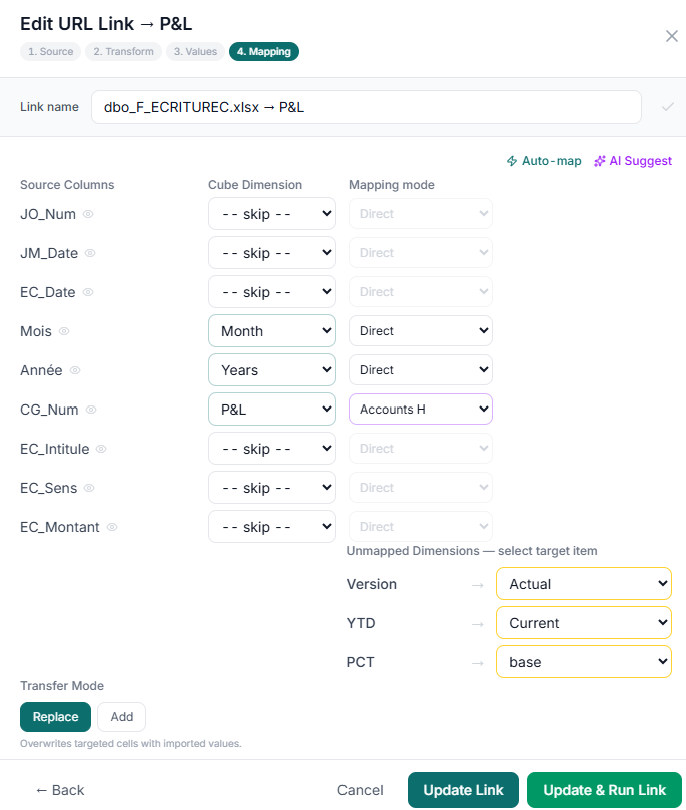
Mapping an Excel source onto a cube: each source column is matched to a cube dimension (or skipped), the remaining (unmapped) dimensions are pinned to a fixed item (Version → Actual, YTD → Current…), and the transfer mode sets how values are written. Auto-map and AI Suggest can propose the mapping for you.
Running, refreshing, reverting
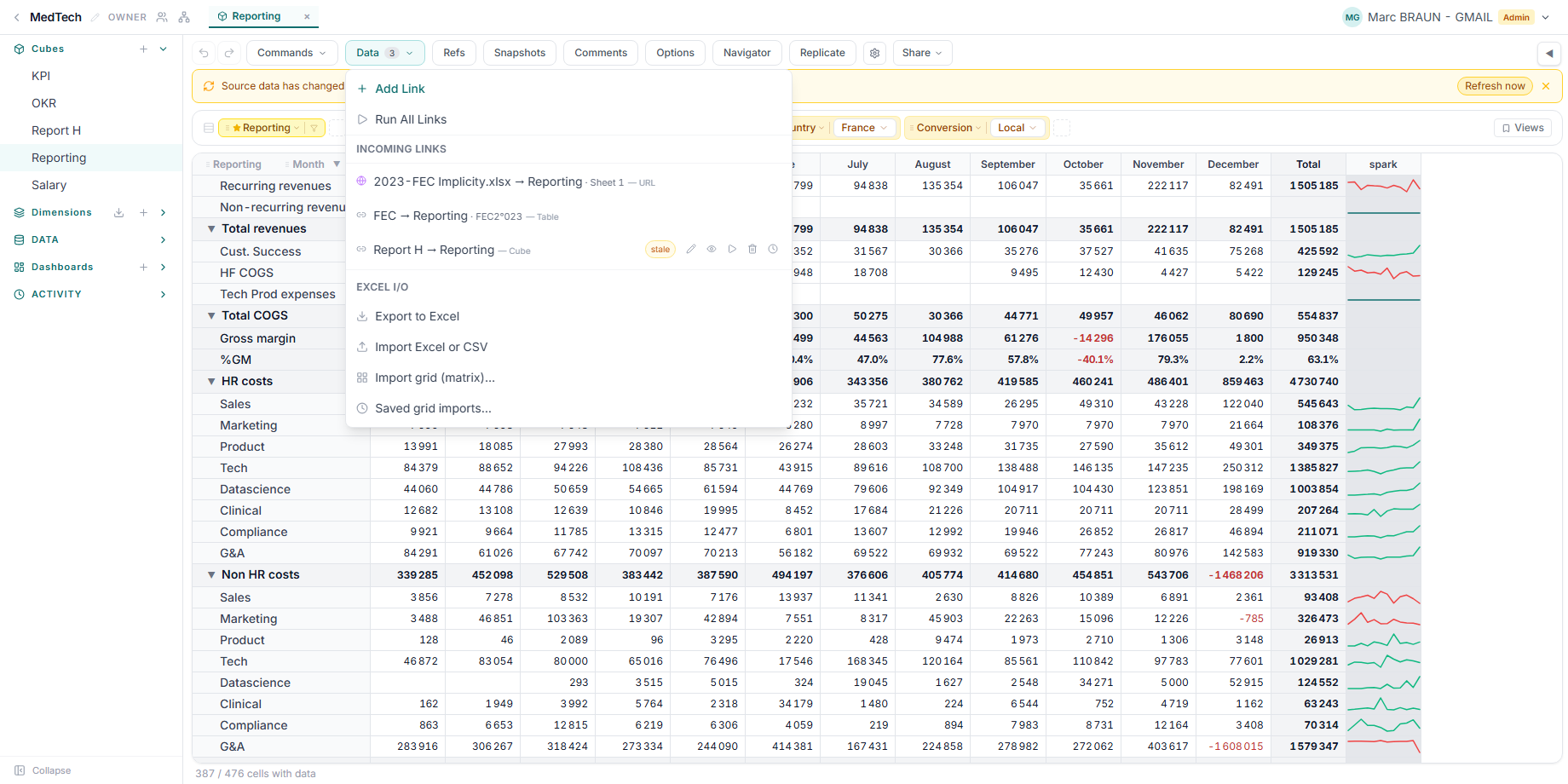
- Run a Link to transfer the data now; Preview shows what would change without writing.
- File-backed Links can auto-refresh — when the underlying Data Table changes, the Link re-runs automatically.
- URL, Data Table and integration Links can also run on a schedule. When a scheduled run fails, the project's owners and admins get an email — once, not on every retry. After five failures in a row the schedule pauses itself (and says so by email) until someone resumes it, and a last email confirms when it works again. An integration's own sync schedule emails the same way on failure and recovery, but never pauses.
- Revert restores the cube to its state just before the last run.
Large sources stream in, so an integration can load far more rows than would fit in memory at once.
Re-running is safe with replace: a replace-mode Link remembers the cells it wrote last time, so a second run overwrites them rather than adding to them, and cells whose source rows have since been deleted are cleared. Add and subtract accumulate — running one twice counts the data twice, so revert first if you need to re-run one of those.
Within a single run the mode is not what combines rows: several source rows landing on the same cell always sum first, and the mode then decides how that total meets the value already in the cell. This is what makes a journal work — twenty entries hitting the same account and period become one figure.
Link or Reference()?
Both move numbers between cubes, so it is worth being deliberate. The difference is push versus pull:
| Link | Reference() / path lookup |
|
|---|---|---|
| Direction | Pushes values into the destination | Pulls a value into a formula |
| When it happens | On a run you control | Live, on every recompute |
| What lands in the cell | Real stored data, editable afterwards | A computed result |
| Undo | Revert restores the prior state | Nothing to undo — change the formula |
| Source can be a Data Table | Yes | No — formulas read cubes only |
| Can do arithmetic | No: copy, add, or subtract only | Yes — any formula |
Reach for a Link when:
- the source is a Data Table — a journal, a transaction list, an assumption register. No cube formula can read a table;
- the destination should be an editable starting point — a budget seeded from last year's actuals that planners then adjust;
- you want an audit point: a run is a deliberate act with a timestamp, a before-snapshot, and a revert;
- the same source has to land in a different slice per destination item. This one is easy to miss. A formula belongs to a dimension item, so it computes identically in every slice of the cube — it cannot say "read the UK cube when I'm on the UK entity, the DE cube when I'm on DE". Three subsidiaries fanning into three Entity slices of a group cube is three Links, each pinning Entity to its own item.
Reach for Reference() (or the inline "Cube"!"ITEM" path lookup) when:
- the value must track the source with no human step — a consolidated total that is never allowed to be stale;
- the transfer involves arithmetic. A Link only copies, so currency translation, allocation percentages, unit conversions and rate applications all belong in a formula;
- the two cubes share the dimension, so alignment needs no configuration at all.
Many correct models use both, split along that line — a formula for the hop that computes, a Link for the hop that stores:
P&L — UK (GBP)   --[ formula: local × FX rate ]-->   P&L — UK (USD)
                                                            |
Elimination journal (Data Table)  --[ Link ]-->      Consolidation (USD)
                                  --[ Link, Entity pinned to UK ]-->
See Cube references and Reference transfer options for the pull side.
Integrations
XCubes ships connectors for these external systems:
| Category | Integrations |
|---|---|
| SQL databases | PostgreSQL, MySQL, SQL Server, Redshift |
| Accounting | Pennylane, Xero |
| Banking | Plaid |
| CRM | Salesforce, HubSpot (guide) |
| ERP | Dynamics 365 Business Central (guide) |
| Market data | Currencies, Stock prices |
You configure a connection once (credentials are stored encrypted), then point Links at it — choosing a table or writing your own query — to feed cubes from live data.
For bringing in cross-tab spreadsheets (a grid of dates × accounts), the grid/matrix importer maps the sheet's rows, columns, and value area onto a cube in one pass, and remembers the layout for next time.
See Cubes & coordinates for where the data lands, and Collaboration for controlling who may change it.